E-Shikshakosh Bihar – Teacher Login, App Login, Download & Portal Guidelines
E-Shikshakosh Bihar 2026 is an online platform created by the Bihar Education Department to manage school, teacher, and student records easily. The portal helps track teacher attendance, student admissions, school facilities, and academic information in real time. Teachers and education staff in Bihar can log in safely using their 12-digit Teacher ID. This system helps make education management faster, more transparent, and fully digital across the state. You can access the official portal at eshikshakosh.bihar.gov.in.
What is E-Shikshakosh Bihar?
E-Shikshakosh Bihar Gov In is the official platform launched by the Bihar Education Project Council (BEPC) that connects all government and aided state schools through a centralized system. It collaborates teacher identity verification, geo-fenced daily attendance, student enrollment, salary processing, and school infrastructure management into a single Aadhaar-authorized portal at eshikshakosh.bihar.gov.in. This system has changed against the older paper-based reporting chain across all 38 districts, and your attendance and profile details here can directly affect your salary payments and transfer approval.
E-Shikshakosh Login & Portal Access (eshikshakosh.bihar.gov.in)
Approaching the official portal requires selecting the correct “User Type” before entering the login details. As of the 2026 update, the Bihar Education Project Council (BEPC) has implemented security rules that have become stricter, so users may now need to verify again using biometrics or an OTP from time to time.
E-Shikshakosh Teacher Login: Step-by-Step
Follow the steps below to access the dashboard for the E-Shikshakosh Teacher Login:
- Access the Official Link: Visit https://eshikshakosh.bihar.gov.in/.
- Select User Type: On the right side of the login panel, click the dropdown menu and select “Teacher”. (Choosing “School”, “Official”, or “Other” by mistake is the #1 cause of login errors).
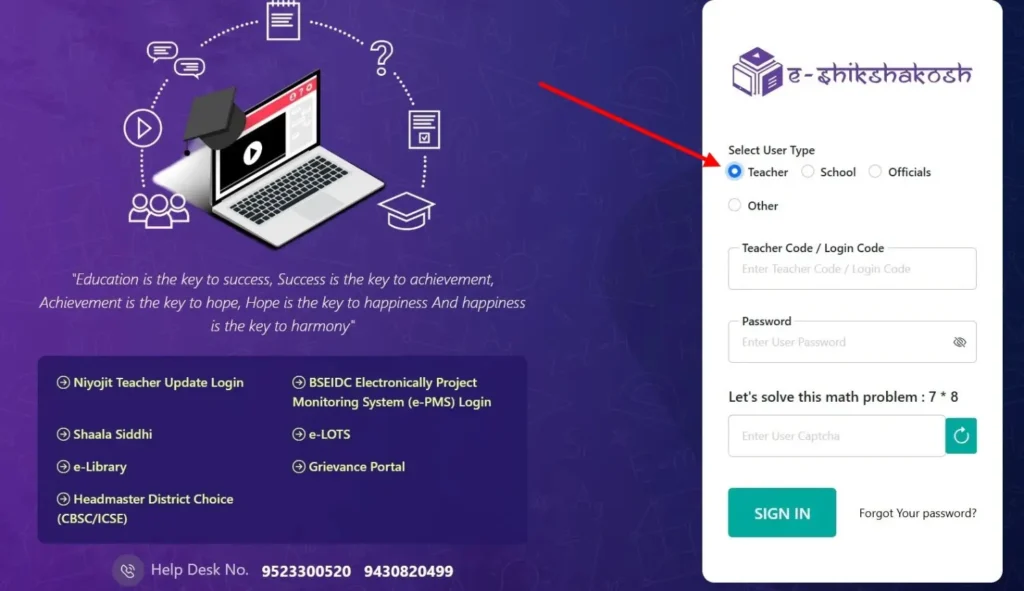
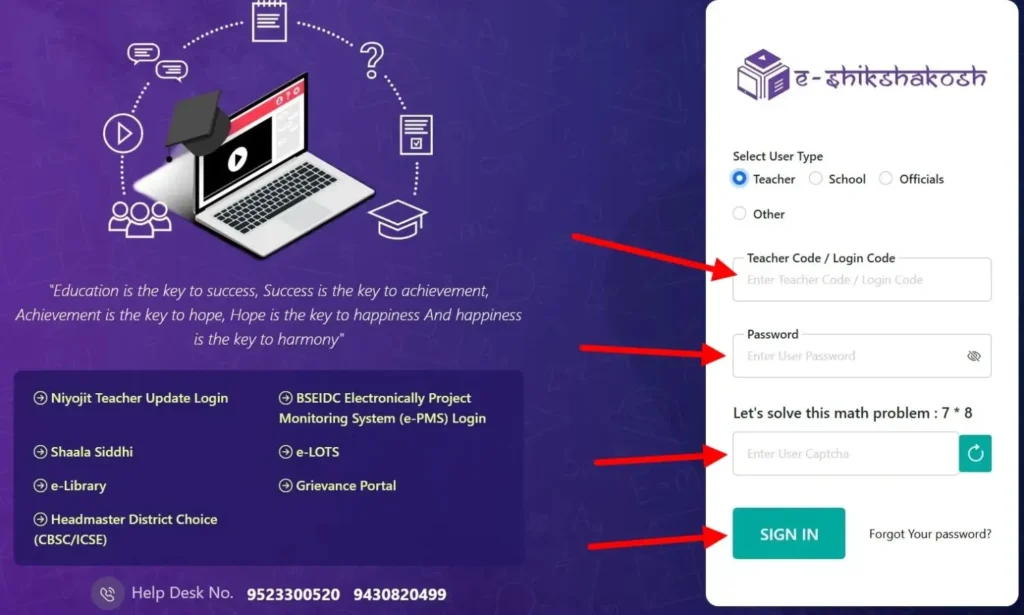
- Enter Your 12-Digit Teacher ID: Enter your unique E-Shikshakosh ID provided during your registration.
- Select Your Login Method:
- Password Method: Put your secure password.
- Login via OTP: If you have forgotten your password or if you are login another or a new device, click “Login with OTP.” A 6-digit code will be sent to your Aadhaar-linked mobile number.
- Security Math Captcha: Solve the captcha (e.g., 6+2=8) to prove you are a human.
- Dashboard View: When you are verified, the main dashboard in front of you, where you can see modules for Attendance, Leave Management, and Salary Slips.
iOS Users Note: A full native iOS app is not yet available with all administrative features. The recommended workaround is to open eshikshakosh.bihar.gov.in in Safari, tap the ‘Share’ icon, and select “Add to Home Screen.” This creates a high-performance shortcut that functions like a native app while providing the full desktop-grade portal features.
School, HM & Officer Login Protocol
Unlike teacher logins, the School, Headmaster (HM), and Official logins are made for managing the whole school system. These accounts help users check and approve data, manage leave requests, and handle the school’s digital Service Book easily.
- Direct Access: Go to the official portal page: http://eshikshakosh.bihar.gov.in./
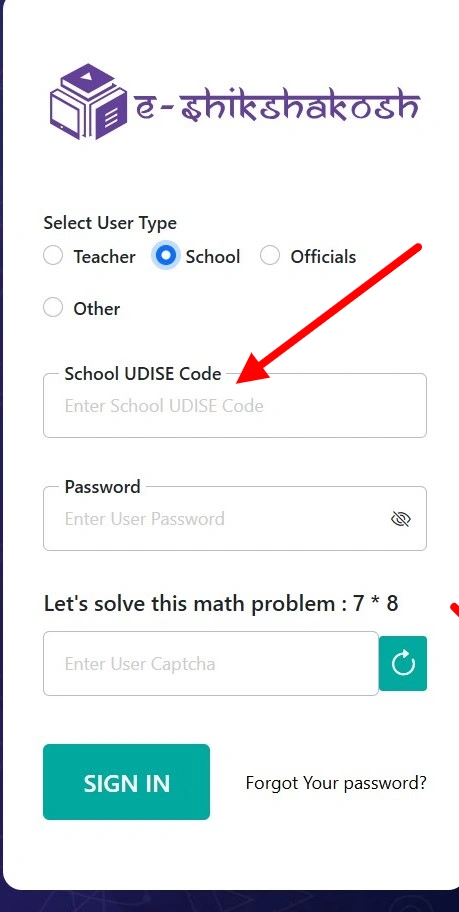
- Select User Type: On the login dashboard, select “School”.
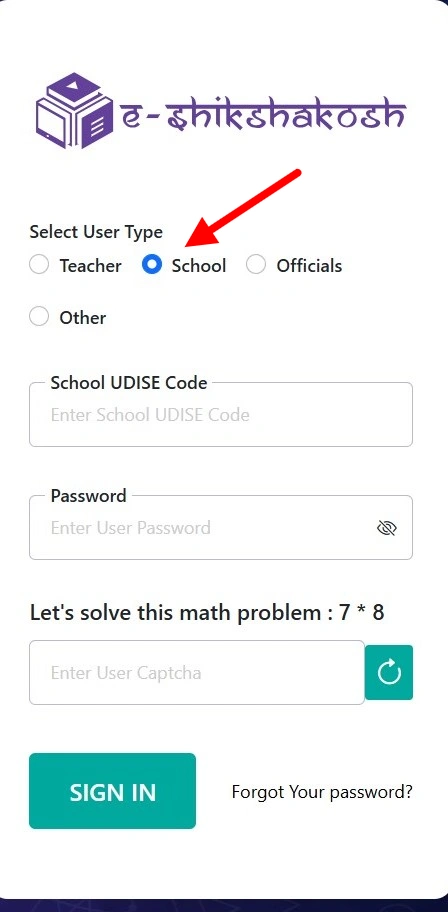
- Login Entry (The UDISE Key):
- School Login: Your User ID is your school’s 11-digit UDISE+ Code.
- Official Login: Use the approved Departmental ID provided by the Bihar Education Project Council (BEPC).
- Security Challenge: Solve the Captcha. If the image is not shown clearly, click the “Reload Captcha” icon next to the box.
- Biometric Trigger: Keep in mind that for sensitive administrative works (like teacher transfer approvals, or student disenrollment tasks), the system may trigger a Biometric/Aadhaar-linked OTP verification for the logged-in HM or Officer to confirm a high level of security.
E Shikshakosh – Exploring the Dashboard Interface
When you log in, you choose the E-Shikshakosh portal. Understanding the sidebar modules is the best way to use the site without making errors.
Key Modules Found on the Sidebar:
- 1. Teacher Module (शिक्षकों के लिए):
- This is the hub for Teacher Registration and Profile Management.
- Pro Tip: Use the “Teacher Search” sub-module to see the list of all educators at this time appointed to your school.
- 2. Student Module (छात्रों के लिए):
- Student Info: Look enrolled student records.
- Add Student: The interface for entering new admissions (Class 1-12).
- Disenrollment: A very difficult task for HMs to remove students who have left the school or transferred out.
- 3. School Module (स्कूल प्रबंधन):
- Used to update school infrastructure data, such as the number of functional toilets, classrooms, and availability of electricity/internet (linked to the e-PMS system).
- 4. Attendance & Leave (उपस्थिति और अवकाश):
- Here are the HMs who can view daily attendance summaries. This module also handles the approval center for teacher leave applications submitted via the mobile app.
- 5. e-Library & e-LOTS (डिजिटल संसाधन):
- A collection of textbooks and teaching materials. Teachers can open these from the dashboard and show them on screens in Smart Classrooms.
Navigating Safely:
When you click on the “Submit” button, always use the “View” (आंख का निशान) icon. This opens a preview of the data entry, allowing you to catch spelling mistakes or Aadhaar digit errors before they become permanent records on the government server.
E-Shikshakosh App Download
For the best and most useful experience, always use the official store because it gives automatic updates. However, we have also provided another method for older devices or limited networks.
- Open the Play Store and search for “e Shikshakosh”.
- Confirm the developer is listed as Bihar Education Project Council (BEPC).
- Click “Install” to get the latest 2026 version.
Warning: Any APK or third-party download file claiming to be an E-Shikshakosh download is unofficial and should be avoided. Always download only from the official Play Store or the Bihar government portal.
Minimum device requirements: Android 9.0+, 2GB RAM, 100MB free storage.
What’s New in E-Shikshakosh?
The 2.0.x update was launched exactly to confirm the high failure rate of the attendance module in rural Bihar. The updated version introduces major improvements for two core technologies:
- Enhanced GPS Precision: The app now offers “Fused Location” technology. It is strongly connected to mobile tower data and GPS satellites to clarify that teachers within the school premises are not wrongly flagged as “Out of Range.”
- Advanced Biometric & Selfie Module: The new version uses an AI selfie feature to stop fake attendance. It checks if the person is really present and alive, so people cannot use photos to mark attendance.
- Sync Speed: The “Upload Saved Data” function is now 40% faster, especially on 2G and 3G networks, which are mostly found in remote blocks.
E-Shikshakosh App Login & Offline Attendance Mode
A common issue for teachers is the lack of “on-demand” internet in rural Bihar during school time. The latest app version resolves this with complete strong Offline Mode.
- Initial Login: You need to have an internet connection be a first-time login of the day to access your “Master Data.” For login, you need your 12-digit Teacher ID and password.
- Marking Attendance Offline: * If the internet is stuck or gone, while you are at school, you can still click “Mark Attendance”.
- The app will capture your timestamped selfie and GPS coordinates locally.
- A message will appear: “Data saved locally. Please connect this when the internet is available.”
- The “Upload Saved Data” Step:
- When you are in an area where the internet is available (or if you are using a hotspot), open the app and go to the “Upload Saved Data” module.
- Click “Sync All” to upload and approve your offline attendance to the BEPC servers.
- Warning: If you do not sync your data by 8:00 PM on the same day, your attendance may be marked as “Pending” or “Absent” in the final district report.
Teachers and Schools Registration Guide
The registration process is the most careful part of the E-Shikshakosh journey. The Bihar Education Project Council (BEPC) has automated many verification steps. However, the first data entry is still done manually by the school staff.
New Teacher Registration & Obtaining Your 12-Digit ID
For newly appointed BPSC TRE 3.0/4.0 or transferred teachers, your 12-digit Teacher ID is your digital identity. You cannot generate this ID yourself; it must be generated by your school administration.
- Data Submission: Provide your Principal with your joining letter, Aadhaar card, and bank passbook.
- HM Dashboard Entry: The Headmaster login the portal, goes to the “Teacher Module,” and chooses the “Teacher Registration.” then headmaster enter your service data information, including their category (BPSC/Niyojit) and appointment date.
- Verification Flow: When he submits the teacher data, the next step documents forward to the District Education Office (DEO) for digital verification.
- ID Generation: If DEO approves and verifies all details, your unique 12-digit Teacher ID is generated. You will receive your ID via SMS on your registered mobile number.
- The 72-Hour Rule: * If your ID is not created after 72 hours of submission of your data, ask the HM to check the “Application Status” in their dashboard.
- “Returned with Query”, There is an error in your Aadhaar or name that needs to be corrected. “Pending”, Request the school to use the portal’s “Grievance” module to escalate the delay to the District MIS Officer.
School Registration & UDISE+ Data Integration
Every school and college in Bihar, whether government, aided, or private, must join the system so student information can be added to the state’s central database.
- Initial Signup: Visit the official portal and choose “School Registration.”
- UDISE+ Validation: Enter your school’s 11-digit UDISE Code. The system will automatically fetch basic school details from the national UDISE+ database to confirm accuracy and consistency.
- Profile Completion: HMs must fill in the school’s management type, personal contact information, and appointed headmaster details.
- Document Upload: Scan and upload the school’s approval certificate and the HM’s official ID.
- Approval: The registration is forwarded to the Block Education Officer (BEO). When your application is approved, the school receives its master login details via the registered email.
Private Schools: All private schools in Bihar must also register using their official 11-digit UDISE+ Code to accurately manage student academic records and track enrollment/transfers.
Niyojit Teacher Update Login: Academic Management
For Niyojit (Contractual) Teachers, the portal plays a dedicated role in digitizing service records and monitoring competencies through Sakshamta Pariksha data integration.
- Accessing the Module: Use the dedicated “Niyojit Teacher Login” link on the homepage.
- Service Record Verification: Teachers must verify their “History of Posting” and basic appointment information. This is very important and sensitive for calculating seniority and promotion eligibility.
- Document KYC: Niyojit teachers are required to upload their educational documents and the basic “Niyojan” (appointment) letter.
- Correction Protocol: If any historical data is incorrect, the teacher needs to submit a “Correction Request” through their dashboard, which requires a physical verification of the original service book by the BEO office.
Advanced Troubleshooting: Fixing Common Errors
Technical issues on the E-Shikshakosh portal are mostly related to three areas: device settings, server-side delays, or expired login credentials. Below are the mentioned steps.
Fixing “Out of Range” & GPS Location Errors
The “Out of Range” error is the #1 reason for failed attendance because sometimes the internet does not work correctly. This happens when your phone’s GPS data doesn’t match the school’s geo-coordinates stored in the BEPC database.
- Calibrate Your GPS: Before opening the app, open Google Maps. Walk a few steps and confirm the internet is working correctly, and the blue dot is a step forward. If it has a large light-blue circle around it, your GPS is not connected. Move away from tall buildings or tin roofs. Go to plain surfaces, and your GPS will work accurately.
- Set to “High Accuracy”: Go to Settings > Location > Advanced and verify “Google Location Accuracy” is toggled ON.
- Clear App Cache: If the app continues to display your “Last Known Location” instead of your current one, go to Settings > Apps > e-Shikshakosh > Storage and tap Clear Cache. Avoid selecting Clear Data unless you are ready to sign in again.
- The “10-Meter” Rule: The app has a strict 10-meter radius. If the error continues, try marking attendance from the center of the school building or the specific spot where the school’s “Master Geotag” was originally captured.
OTP Not Received & Login Credential Issues
Many users face problems in the “Login steps”; they enter all the details and fill the captcha, but never receive the verification code required for security protections.
- SMS Gateway Delays: During peak hours (9:00 AM – 10:30 AM), the Bihar government SMS gateway may become overloaded. Avoid clicking “Resend OTP” repeatedly and wait at least 3 minutes before trying again.
- Check DND Settings: Confirm that your mobile number does not have “Do Not Disturb” (DND) active for service messages.
- The “Invalid Credentials” Loop: If you are certain your password is correct, but it still fails:
- Check if you are mistakenly selected “School” instead of “Teacher” in the User Type dropdown.
- Ensure there are no extra spaces at the end of your 12-digit ID.
Recovering Forgotten IDs & Password Reset
If you have lost access to your account, follow the official recovery path instead of trying to create a new profile.
- Recovering Teacher ID: You cannot address your ID via the public portal. You must ask your Headmaster (HM) to log in to the School Dashboard, go to the “Teacher Module,” and retrieve your 12-digit permanent ID from the staff list.
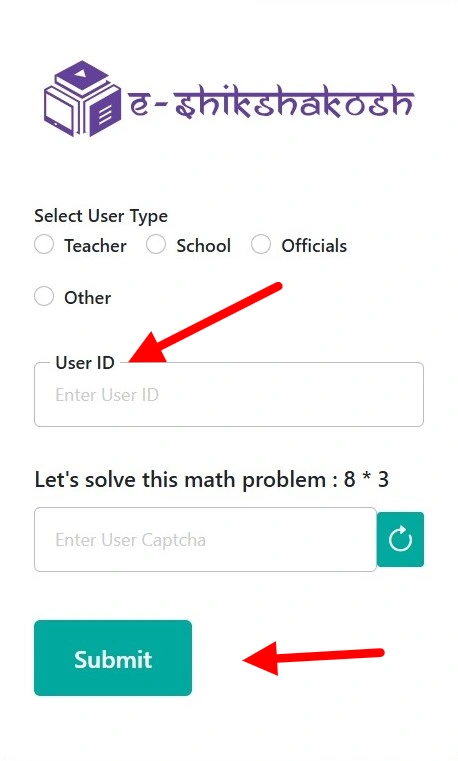
- Password Reset via Portal: * Go to the E-Shikshakosh Login Page.
- Click “Forgot Password?”.
- Enter your User ID and solve the math query.
- Helpdesk: If your mobile number has changed and you can no longer receive OTPs, you must submit a written application to your District Education Officer (DEO) to update your profile with the new mobile number.
Integrated Modules: e-PMS, e-LOTS & Vidya Bodh
The E-Shikshakosh ecosystem extends far beyond just “Teacher Data.” It is now utilized for Bihar’s school infrastructure and digital learning.
e-PMS Login for Infrastructure & Project Monitoring
The Electronic Project Monitoring System (e-PMS) is a specialized platform designed to monitor the physical progress of schools. It is used by school development committees and contractors approved by BSEIDC
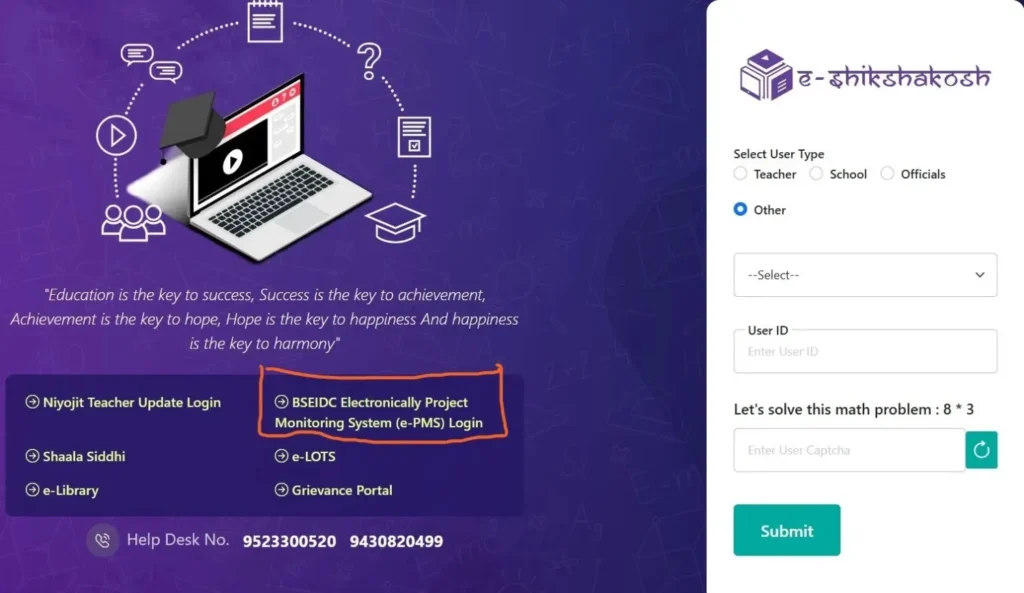
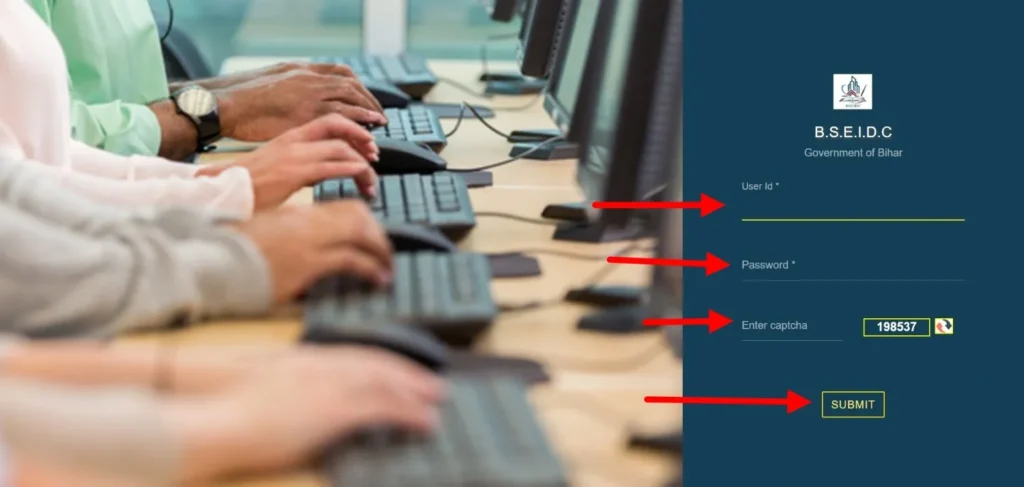
- Login e-PMS: Visit the main portal eshikshakosh.bihar.gov.in, click on the “BSEIDC e-PMS Login” link. This will be redirected to a specialized subdomain:
cwedu-eshikshakosh.bihar.gov.in.
- Contractor/Manager login Details: Teacher logins, e-PMS requires a BSEIDC-specific ID and a secure password.
- Real-Time Tracking: After logging in, managers can upload geotagged photos of ongoing construction (classrooms, toilets, boundary walls).
- Fund Disbursement: The system automatically releases repair and construction funds based on the verified completion percentage shown in these digital reports, ensuring complete transparency.
e-Library (e-LOTS) & Vidya Bodh Digital Resources
To advance the “Digital Bihar” campaign, the department has divided all Teaching-Learning Materials (TLM) into two main categories.
- e-LOTS (Library of Teachers & Students): Approachable at bepclots.bihar.gov.in. In this method, textbooks have been digitized for classes 1–12, along with subject-wise video lectures and interactive quizzes.
- Vidya Bodh Platform: A specialized mission of 2026 offering more than 10,000+ STEM resources, virtual labs, and NCERT/SCERT-managed worksheets.
- Access Method: You can access these via the “Digital Resources” tab on your E-Shikshakosh dashboard. No other login credentials are required if you are already signed into the portal.
e-Shikshakosh DCF 2025-26 PDF & Data Entry
The Data Capture Format (DCF) is the document used for the annual school profile update. This is a completely hybrid process.
- Download the PDF: Visit the “Downloads” portion of the portal to get the latest DCF 2025-26 PDF.
- Manual Draft: The recommended process is to first fill the physical PDF by hand, and confirm that all student details, like Aadhaar, Bank Account, and Social Category, are cross-verified by parents.
- Digital Submission: Visit the School Dashboard and log in to this, go to “Student Module” > “DCF Entry,” and transfer the data from your PDF into the system.
- Verification: After submitting the DCF, the HM must “Freeze” the data to transfer it to the District MIS officer for final UDISE+ attached verification.
Grievance Redressal & Official Support Channels
Issues with salary, transfers, or data mismatches can create irritations. The Bihar government has introduced the “Complaint Section” through the SHAKTI and Lok Shikayat protocols.
Filing a Grievance on the SHAKTI Portal
If you face a “Salary Hold” or a “Transfer Dispute,” follow the steps below:
- Log in to Dashboard: Open your teacher/school profile on E-Shikshakosh.
- Initiate Complaint: Click on the “Grievance” module (sometimes labeled as Service Request).
- Select Category: Select the exact nature of your issues (e.g., Salary Payment, Correction in Service Book, or Mutual Transfer Issue).
- Upload Evidence: Attach your additional documents, e.g., bank statement or appointment letter.
- Track Ticket ID: When you click on submit, you receive a SHAKTI Ticket ID. The department is responsible for providing a resolution or status update within 72 hours.
Official Support: District Helpdesk & MIS Contacts
When you are facing issues, and they are not being solved, the final step is to go to the MIS Nodal Officer.
| Level | Responsible Authority | Contact Purpose |
| Block Level | BEO / Block MIS | Registration errors, forgot password, and mobile number updates. |
| District Level | DEO / District MIS | ID Generation delays, UDISE+ is not matching. |
| State Level | BEPC Helpdesk | Server down, App bugs. |
Official Helpline Numbers (2026): 0612-2215181 / 0612-2233973
- Email Support: helpdesk.esks@gmail.com
Impact & Statistics (2024–2026)
| Metric | Data |
|---|---|
| Schools covered | 70,000+ |
| Students enrolled | 35 million+ |
| Teachers registered | 500,000+ |
| Daily active users | 50,000+ |
| Teacher attendance improvement (2024 BEPC Audit) | +22% |
| Paper sheets replaced annually | 8.2 million+ |
| Student dropout reduction since 2022 (UNICEF-Bihar) | 28% |
| Mid-Day Meal compliance tracking | 97% adherence |
Future Roadmap: What’s Coming to E-Shikshakosh
The Bihar Education Project Council has announced the following planned upgrades:
- Parent Module (Q1 2026): A dedicated module to keep parents updated on student attendance and academic performance via SMS alerts and performance reports. This will auto-generate Parent-Teacher Meeting (PTM) reports.
- AI-Driven Analytics: Artificial intelligence integration to analyze student data, predict learning gaps, and recommend personalized teaching strategies for educators.
- Regional Language Interfaces: Portal interfaces in Bhojpuri, Maithili, and Magahi to make the system more inclusive for teachers across all regions of Bihar.
- Biometric Attendance Expansion: Wider rollout of hardware-based biometric attendance systems across more schools.
- DIKSHA Training Integration: Deepened synchronization with DIKSHA to push targeted teacher training content based on attendance and performance data.
Conclusion
The E Shikshakosh Bihar portal has evolved from a document storage system into the central operational hub of every teacher’s professional life in Bihar. With the 2026 updates – including AI selfie-based attendance, Fused Location GPS, 100% digital leave management, DIKSHA integration, and the upcoming Parent Module – the platform continues to advance Bihar’s education governance at scale. Keeping your app updated to v3.5.0, ensuring your KYC details are accurate, and syncing attendance daily before 8:00 PM are the three habits that will keep you compliant and headache-free.
FAQs
How do I update my mobile number on the E-Shikshakosh portal?
Log in to the Teacher Module and open “Edit Profile” under Teacher Registration. Enter your new mobile number, verify it with the Aadhaar-linked OTP, and allow 12–24 hours for the update to sync.
Can private schools register on E-Shikshakosh Bihar?
Yes, private schools in Bihar must register using their official 11-digit UDISE+ Code. This will help you to accurately manage student academic records across institutions.
What is the latest version of the E-Shikshakosh app for 2026?
The latest stable release for 2026 is v3.5.0, which improves GPS accuracy and fixes Master Data Download issues. If you update your app regularly, it will help to avoid attendance syncing problems.
How do I check my salary status on EShikshakosh?
Teachers can view salary details through the “Salary/Payment” section in the dashboard. Salary processing is linked with attendance records, so pending attendance may delay payments.
What should I do if the E-Shikshakosh app is not syncing attendance?
First, check your internet connection and ensure GPS is enabled on your device. Updating the app and refreshing the attendance module usually resolves syncing errors.
How can I reset my E-Shikshakosh login password?
Click on the “Forgot Password” option on the login page and verify your identity using your registered mobile number. After OTP verification, you can create a new password securely.